Remove TikTok reposts on iPhone or Android
Open TikTok in the app, load your repost list, preview items, and remove selected reposts with paced automation.
Ang parehong pinagkakatiwalaang repost remover — ngayon sa iyong telepono. Linisin ang iyong TikTok, Instagram, at X reposts sa app.
These visuals and details come from the live Google Play and App Store listings, giving search visitors real product evidence before they tap download.

Simpler. Safe. Clear.
App Store version 1.0.2 · iOS 15.6+ · Google Play listing live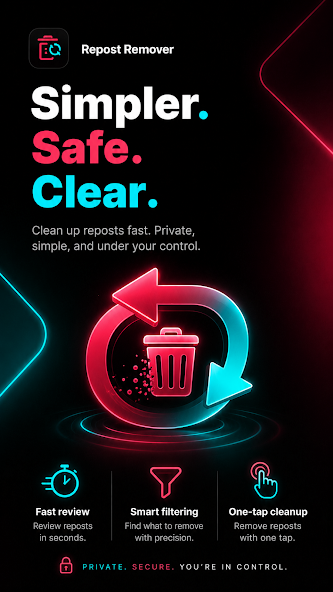
Ang RepostCleanup Mobile ay isang libreng app para sa Android at iOS na nag-aalis ng reposts nang sabay-sabay mula sa TikTok, Instagram, at X. Tumatakbo ito sa built-in na browser ng app, hindi humihingi ng password, at nakakalinis ng hanggang 100 repost bawat araw sa libreng plano — hindi kailangan ng desktop.
Use RepostCleanup when you need a mobile repost remover for high-volume cleanup, selective deletion, or a quick way to tidy an old social profile without deleting reposts one by one.
Open TikTok in the app, load your repost list, preview items, and remove selected reposts with paced automation.
The mobile app gives phone-first users a cleanup workflow without installing a Chrome extension or switching devices.
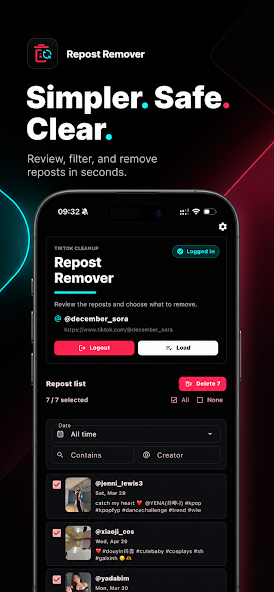
Filter by date, keyword, or creator, then choose all reposts or only specific items before cleanup starts.
The same mobile flow supports Instagram reposted content and X reposts or retweets, not only TikTok.
RepostCleanup now covers mobile and desktop cleanup. Use the iOS app, Android app, or Chrome extension depending on where you manage your TikTok, Instagram, and X reposts.
Install from Google Play and clean reposts directly from your Android phone.
Download on iOS and run the same guided cleanup flow from your iPhone.
Prefer a browser workflow? The Chrome extension remains available for desktop cleanup.
Use the same mobile workflow to clean reposts where they matter most: TikTok reposts, Instagram reposted content, and X retweets/reposts.
Bulk remove TikTok reposts from your reposts tab, preview what will be cleaned, and use the free daily limit from your phone.
Clean Instagram reposted content with the same guided mobile flow, useful when manual removal becomes too slow.
Remove reposts and retweets from X using safe pacing designed for large cleanup sessions.
RepostCleanup Mobile brings preview, filtering, bulk cleanup, and safe pacing to Android and iOS with a touch-first workflow.
Built for iOS and Android from the ground up. Fast, smooth, and designed for one-handed use.
Select all or pick specific reposts to remove. The same one-tap cleanup you know from the extension.
Browse your full repost list, filter by date or keyword, and choose exactly what to keep or remove.
Log into TikTok, Instagram, or X through the app's built-in browser. Your credentials stay on your device.
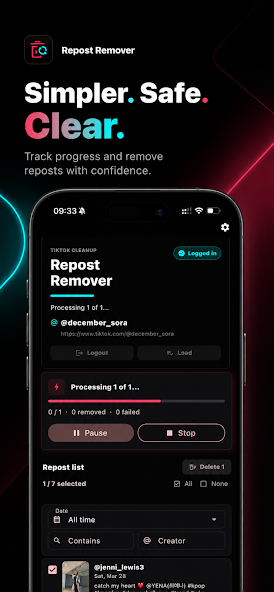
Smart delays between actions mimic natural scrolling speed. Keeps your account safe during large cleanups.
Available worldwide in 11 languages. The same global reach as the Chrome extension.
Get RepostCleanup from Google Play or the Apple App Store. Free to install, no account required.
Open TikTok, Instagram, or X inside the app. Your login stays local — nothing is sent to our servers.
Choose Clear All to wipe everything, or Preview & Select to pick which reposts to keep. Tap start and you're done.
Choose the cleanup method that fits your device, repost count, and privacy expectations.
| Feature | Mobile App | Chrome Extension | Manual Deletion |
|---|---|---|---|
| Best device | Android & iOS | Desktop browser | Any device |
| Bulk remove reposts | Yes | Yes | No |
| Preview before cleaning | Yes | Yes | Only one by one |
| Works without desktop | Yes | No | Yes |
| No password stored by us | Yes | Yes | Yes |
| Safe pacing | Built in | Built in | Manual effort |
| Free daily limit | 100/day | 100/day | Unlimited but slow |
The mobile app is built for people who want a repost remover without setting up a desktop browser extension.
RepostCleanup is designed to remove reposts at a human-like pace while keeping login credentials inside your device session.
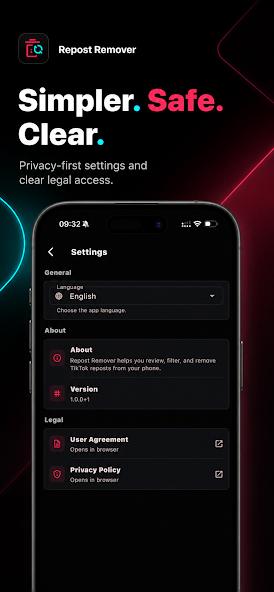
You sign into each platform through the app's built-in browser. RepostCleanup does not ask you to share a social media password with our servers.
Built-in delays avoid rapid-fire actions and make bulk removal behave more like normal browsing.
The app is free to download and includes up to 100 repost removals per day. Premium unlocks unlimited removals.
Yes. RepostCleanup Mobile is live on both Google Play and the Apple App Store. Tap either store button above to download it free.
Yes. The app is free to download with the same 100 reposts/day free tier as the Chrome extension. Premium unlocks unlimited removals.
The best repost remover app is one that supports your platform, lets you preview removals, uses safe pacing, and does not store your social media password. RepostCleanup Mobile is built around those requirements for TikTok, Instagram, and X.
No. You sign into TikTok, Instagram, or X through the app's built-in browser — the same way you log in on the web. Your credentials never leave your device.
Yes. RepostCleanup Mobile is available on both platforms. Requires Android 8.0+ or iOS 15.0+.
Absolutely. They work independently — use whichever is more convenient. Your premium subscription works across both.
Install RepostCleanup Mobile on iOS or Android, open your social platform in the in-app browser, load your repost list, preview or filter the items, then start a paced cleanup session.
Yes. RepostCleanup Mobile is available for both iPhone and Android and is designed to remove TikTok reposts from a phone-first workflow.
Yes. You can preview reposts, filter by date, keyword, or creator, and select only the reposts you want removed before the app starts cleanup.
I-download ang RepostCleanup Mobile nang libre sa Android at iOS.